Articles : How to Add / Use letter Ñ ñ on your Samsung Phone?
full Link : How to Add / Use letter Ñ ñ on your Samsung Phone?
Article DioPen Chinese IME, Article How to, Article Ñ, Article Samsung Galaxy Pocket, Article Samsung keypad, Article Swype,
How to Add / Use letter Ñ ñ on your Samsung Phone?
Using or adding the upper or lower case letter Ñ ñ on your text messages can be a maze specially if you don't know where to find it.

If you're in the Samsung keypad input mode, make sure that the type of your keypad is in QWERTY Keypad.
 If not, follow this step to switch to QWERTY Keypad
tap the gear icon then select QWERTY Keypad
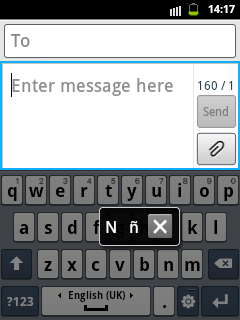
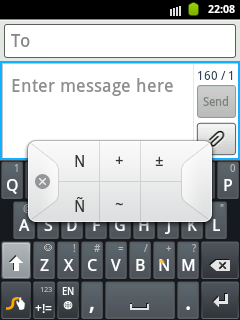
Once you're in the Samsung QWERTY Keypad or Swype Keypad, press and hold the letter N/n until the popup option show.
Screen Capture for Samsung QWERTY Keypad

Screen Capture for Swype Keypad

enough already information about How to Add / Use letter Ñ ñ on your Samsung Phone?
hopefully the information How to Add / Use letter Ñ ñ on your Samsung Phone? can give you answers to all your questions ayang is conveyed to google.
finished already information about How to Add / Use letter Ñ ñ on your Samsung Phone? if you mers this information useful for you and want to bookmark or share please use link https://19miracles.blogspot.com/2013/05/how-to-add-use-letter-n-n-on-your.html?m=1
Tag : DioPen Chinese IME, How to, Ñ, Samsung Galaxy Pocket, Samsung keypad, Swype,


0 komentar:
Posting Komentar